Add This

Bookmark and Share

Thursday, 29 October 2015

Collaborating with Other Schools

We do our best to link up our curriculum horizontally across subjects and vertically across grades, but when it comes to linking it up with other schools, it can sometimes be a bit tricky.

Recently, we've been working on a collaborative project with two wonderful schools, one in the USA in Missouri and the other in Brazil.  Our 6th grade students along with the 6s from the other two schools have been sharing a typical day in their lives with each other, using Google Presentations.

Leap back in time:
This was was not the first time we had done this project. My friend and colleague Lisette Casey, from Colorado first approached me about it six years ago, and we ran a similar project with our then 6th grade, current 12th grade students. It was as simple yet magical a project then as it is now.

Back to 2015: 
Along the way our students have worked on their initial understanding of primary research, Creative Commons licensing and presentation construction. They have created avatars, word clouds, searched for images that represent something important in their lives and even created word searches based on the reflections they have done. Here is a link to all of these resources just in case you are interested in learning more about the process and tools they used.

Yesterday, we held our long awaited web conference with St. Justin Martyr School, in Missouri.  Students prepared for this by submitting questions and ideas  to share with their partner school, using a Google Form.  They also volunteered, if interested, to speak at the conference and prepared their topic prior to the meeting.

Caution: 
One of the things to watch out for when planning a web conference is tech troubles, which may include firewalls and more. We knew this going into it, having participated in quite a few web conferences in the past. We tested, retested and even triple tested and all systems were go, until we had the Performing Arts Centre full of 6th grades (the entire grade) and the partner class was awaiting us in the United States.  We had video but no audio.

Improvising:
Our partner teacher Cindy Lane was wonderful. While I messed around with the techs at our school, she took the reins at her end and had the kids participate in a brief hands up activity. We had video, and audio from her end and her class had video from ours. During the activity, kids responded to a series of questions by using their hands to indicate the answers to her questions.

All that Planning:
Luckily when you work with technology on a daily basis, things like this don't throw you easily. You have a plan B, C and sometimes D up your sleeve and when those don't work, you sometimes cycle back around to plan A. Long story short, we cycled through all of our plans and about 25 minutes later, plan A actually worked. We had video and audio.

Magic:

That was when the fun really began. It is difficult to describe the joy and level of engagement that students experience when participating in a web conference. You really have to be there and live it, but if you can imagine a large room full of smiles,  and electricity zapping every which way, you will have a better idea of what it is like.

This was an unforgettable sharing and learning experience  for our students, one which I am sure they will remember the rest of their lives.

It is vital that the current generation of children  learn to actively engage with the world in a positive manner and practice good netiquette in doing so. Experiences such as this one help students build their understanding of global citizenship and embrace its values and practices.


Friday, 9 October 2015

Our New Animation Stations-Part 2

We have just finished up our first carousel with the 7s using the new animation stations.


The painting wasn't quite done when we began, so we didn't maximise their complete potential this time around. That said the new tripods provided more versatility and much needed stability, while the green surface gave the kids a chance to experiment with using DoInk's Chromakey tools  when applying different images to their animations.


For more on the tripods and the apps we used, checkout our previous post on the new animation stations.

During the next carousel,  we will be able to make full use of all of the chromakey options, thereby eliminating the need for printed backdrops.

Here are two examples of finished videos from this first carousel, in which the students used printed backdrops, combined with the images  they added using DoInk's GreenScreen app for iPads.


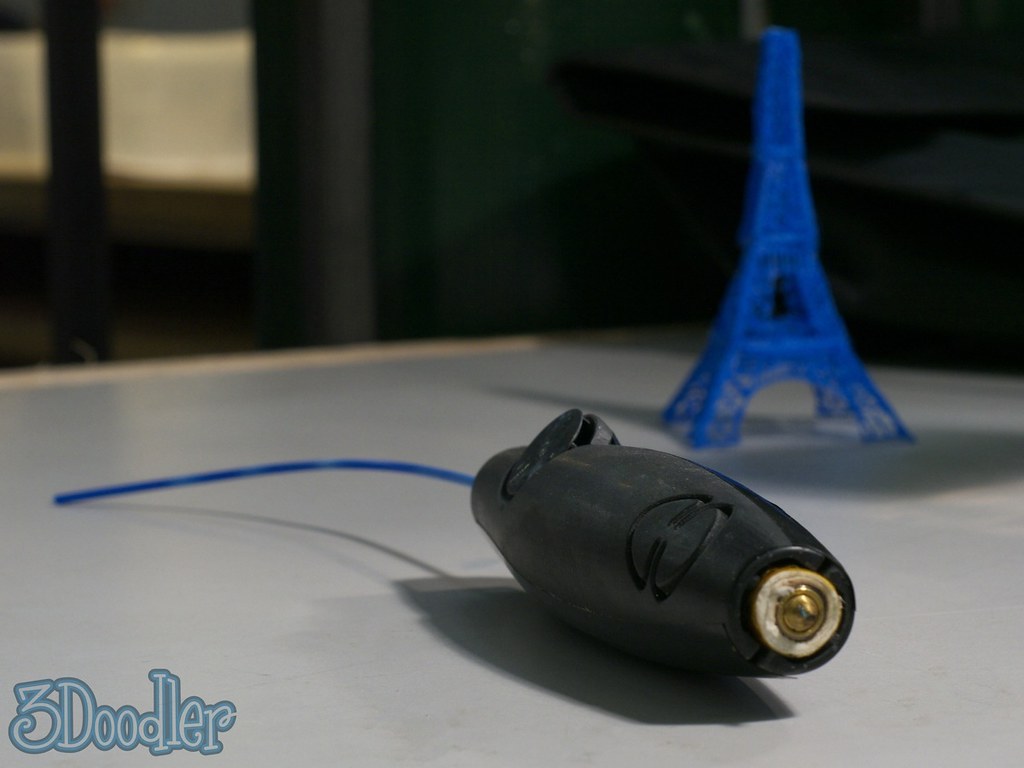
3Doodler Pens


We have used our new 3Doodler Pens with our 8th grade in 3 lessons so far and have already learnt so much.


The pens, which can be purchased for under $100 are very student friendly, effective 3d printing devices. 


During the different lessons when the kids were introduced to them through a couple of short videos (I have embedded one just above this.), some models we had made and a brief talk about expectations the electricity in the air became  almost overwhelming. 


The last time I saw kids so excited about a new tool was when I introduced my 8th graders, 8 years ago to then, Google SketchUp(now Trimble SketchUp).  


The videos and explanations were punctuated by enthusiastic outbursts of "How cool!" "I want one!" and a variety of interesting interjections.


In practice the kids took to them right away. We gave them printed templates, and a few tasks written up in a Google Document, which also contains space for reflections, notes and images documenting their work.


These pens have proven to be a fantastic investment which will be used throughout the year, both in lessons and in our new Makerspace.


We will add updates and more images documenting the work, as the year progresses. 


Tuesday, 22 September 2015

Minecraft in ICT Lessons


This is an update on where we are at with  Minecraft Edu, which we have used  for the past 3 years in our 7th grade lessons. It  has quickly become a huge favourite for both teachers and students and we are looking at ways to bring it into other grades within the curriculum.

We have done several things with it in the past, such as building it into a fortress challenge, where students use their knowledge and skills from History class to plan and build a strong fortress. Needless to say, we tested out their designs in the end, in survival mode and the action was glorious. 
We have also done a Survival Island unit, where we shipwrecked the kids and sent them small challenges each lesson. They had to deal with all sorts of issues, which we threw at them, while trying out their skills at surviving on an island. 

Last school year we took a critical looking at the Mars One project and decided to send our kids on a mission to Mars. We found a great map online and landed our kids on it. Again we presented them with a series of challenges each lesson and they did their best to survive. Here is ashort video I did of them while we were working on the project.

We use reflection journals which we build in Google Docs for most of these projects. These are shared through with students, either Doctopus or Google Classroom and they work through them during each unit. 

This is the first year we are planning to use it in our 8th Maker Unit. We will spend a week looking at encoding images and have the kids design their own using a pixilation tool. They will then proceed create their designs in Minecraft. Some of our students did a similar activity 2 years ago. Using 8 bit images they found on the web, they built an enormous Mario and Pikachu in Minecraft. I have included a screenshot of this from our video below. (You can also see the students in the chat informing his partner in Spanish that he was building the mouth.)


Finally, we have run Minecraft as part of our gaming club in the past. During this time the Hunger Games was a big deal, so the students decided we should spend a few lessons running the Hunger Games on our server. They created the arena, the pedestals, and  the cornucopia. I enclosed the arena for them so they couldn't flee and played the role of Game Master for them.  We all had an amazing time. 
If you haven't looked into using Minecraft with your students you should. They will build machines, mix potions, use formulas for crafting and have an amazing time doing it. Send out a Google Form to find your Minecraft Masters, put them in teams with a Master in charge of mentoring and leading the builds and let the learning begin! The only thing you may regret is that you didn't start sooner.

------------------------------

Saturday, 19 September 2015

A Feature Article on Our Work

Recently we were approached by the people at iStopMotion about the ways in which we use the program with our students.   We responded and shared our 7th grade animation project with them as well as our YouTube Playlist of Best Animations from last year's DVA.

We are very honoured that they chose to write an article about our work and would like to take this opportunity to share it with the community.

Please click here to read the article.

You can watch some of our student videos below.

Taking the Leap-Maker Spaces in the LRC

Makerspaces offer engaging hands-on creative opportunities for learners to experiment and develop their skills in STEAM: Science, Technology, Engineering, Art, Mathematics through student centred, student driven project, embedded within the curriculum, through drop in sessions and as after school clubs  in Learning Resources Centres, libraries and classrooms.

Makerspaces come in a variety of shapes, sizes and are are multipurpose in design. While some are high tech others rely on relatively little technology. They lend themselves perfectly for teaching and learning STEAM skills and concepts. They are places where learners can go to think critically and creatively, plan and experiment, where they have access to tools, materials and resources, where they direct their learning and become inventors and innovators. Makerspaces can  include resources and spaces for electronics, programming and robotics, arts and crafts, woodworking, sewing, gardening and more. They are flexible spaces, often comprised of multiple venues, with plenty of storage and work surfaces, mobile and/or fixed.  
We happened upon this  learning trend  through a discussion with an ex student who is directly involved in the planning and implementation of makerspaces in schools, and immediately  recognised the potential makerspace  and steam learning offered our students and teachers.  This was a way forward for our school.  This was just over a year ago. Since then we have been exploring our options, collecting resources, attending sessions on makerspaces, developing a plan and putting it into action.


Since this time we have developed a tiered system of drop-in, clubs and curriculum based maker activities, developed resource banks, identified and equipped different areas of the LRC with materials and storage and identified areas of the curriculum both academic and extra curricular in which . Through our makerspace initiatives our students and staff members participate in  the active acquisition of important skills through critical thinking, exploration and creative invention. They make connections and build upon their learning experiences, both in school and in their personal lives.   
We measure our success not only by the acquisition of new skills and concepts, but also by the levels of excitement, initiative and student engagement we have observed so far, as we blast through traditional subject barriers, and take huge leaps into dynamic student lead creative experiences.
Here are a few more examples of student work so far. We look forward to sharing more on this topic in the near future.  


Websites / URLs Associated with the Session:

Tuesday, 8 September 2015

Our New Animation Stations-Part One!


We decided last school year that our current tripod, nootle and ipad combination for shooting animation footage were just not working out.

It was then that we discovered the G7 Pro iPad Tripod. It turns out it was the best choice we could have made.


Today, while the new animation workspace was being painted chromakey green, we moved the students out of the studio and set them up with their G7s and iPads.  They had a wonderful time as they worked at provisional stations, filming the initial animation sequences for the stories they had written.

Both teachers and students were thrilled with the flexibility and sturdiness of the G7s. This  combined with the use of iStopMotion and Green Screen by DoInk has really helped us to streamline the animation process and keep frustration levels low.  Having a more stable setup this time around will pay off nicely in the end, as student productions will be much smoother than they have been in the past.